Massive Actions
Goals
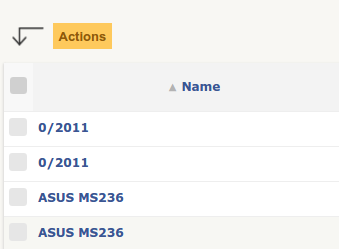
Add to itemtypes search lists:
a checkbox before each item,
a checkbox to select all items checkboxes,
an Actions button to apply modifications to each selected items.
Stages
Processing is splitted in three stages (each handled by a different file).
They are determined by the MassiveAction constructor $stage parameter that determines its behaviour.
Stage 1: initial
File: ajax/massiveaction.php
When: The user checks items and clicks the bulk actions button.
What this stage does:
Collects checked items (
$_POST['item'][itemtype][id] = 1)Calls
MassiveAction::getAllMassiveActions()for each itemtype → aggregates available actionsStores items in
$POST['items']and the action list in$POST['actions']Displays a dropdown listing available actions
Each change in the dropdown triggers an AJAX call to the
specializestage
Stage 2: specialize
File: ajax/dropdownMassiveAction.php
When: The user selects an action from the dropdown.
What this stage does:
Retrieves the chosen action and its label from
$POST['actions']Filters out items that do not support the action (via
action_filterandgetForbiddenStandardMassiveAction())Extracts the processor: if the action key contains
ClassName:action_name, the processor isClassName; otherwiseMassiveActionis used by defaultCalls
$processor::showMassiveActionsSubForm($ma)→ displays fields specific to the actionHidden fields are injected via
$ma->addHiddenFields()
The processor is the class that contains the subform and the processing logic. It is encoded in the action key:
<?php

// Action key with explicit processor
$actions['MyClass:my_action'] = 'My action';

// Implicit processor = MassiveAction
$actions['MassiveAction:delete'] = 'Move to trash';
Stage 3: process
File: front/massiveaction.php
When: The user submits the form from the specialize stage.
What this stage does:
Initialises result counters:
ok,ko,noright,noaction,messagesCalls
$ma->process()→processForSeveralItemtypes()For each remaining itemtype, calls
$processor::processMassiveActionsForOneItemtype($ma, $item, $ids)Displays a progress bar
If processing takes more than 5 seconds, reloads the page with the session identifier to continue (anti-timeout), via
$ma->itemDone()Redirects to the previous page with a result message
Update item’s fields
The first option of the Actions button is Update.
It permits to modify the fields content of the selected items.
The list of fields displayed in the sub list depends on the Search options of the current itemtype.
By default, all Search options are automatically displayed in this list.
To forbid this display for one field, you must define the key massiveaction to false in the Search options declaration, example:
<?php

$tab[] = [
   'id'            => '1',
   'table'         => self::getTable(),
   'field'         => 'name',
   'name'          => __('Name'),
   'datatype'      => 'itemlink',
   'massiveaction' => false // <- NO MASSIVE ACTION
];
Specific massive actions
If default massive actions are not sufficient for your needs, you can define your own massive actions. 3 methods must be defined to achieve this.
declare the actions in
getSpecificMassiveActionsdisplay the form in
showMassiveActionsSubFormprocess in
processMassiveActionsForOneItemtype
<?php

...

 public function getSpecificMassiveActions($checkitem = null)
 {
     $actions = parent::getSpecificMassiveActions($checkitem);

     if (Session::haveRight(self::$rightname, UPDATE)) {
         $actions[self::class . MassiveAction::CLASS_ACTION_SEPARATOR . 'update_visibility']
             = __('Visibility');
     }

     return $actions;
 }
Next, implement showMassiveActionsSubForm to display the form :
<?php

...

public static function showMassiveActionsSubForm(MassiveAction $ma) {
   switch ($ma->getAction()) {
      case 'myaction_key':
         echo __("fill the input");
         echo Html::input('myinput');
         echo Html::submit(__('Do it'), array('name' => 'massiveaction'))."</span>";

         break;
   }

   return parent::showMassiveActionsSubForm($ma);
}
Finally, for processing implement processMassiveActionsForOneItemtype method:
<?php

...

static function processMassiveActionsForOneItemtype(MassiveAction $ma, CommonDBTM $item,
                                                    array $ids) {
   switch ($ma->getAction()) {
      case 'myaction_key':
         $input = $ma->getInput();

         foreach ($ids as $id) {

            if ($item->getFromDB($id)
                && $item->doIt($input)) {
               $ma->itemDone($item->getType(), $id, MassiveAction::ACTION_OK);
            } else {
               $ma->itemDone($item->getType(), $id, MassiveAction::ACTION_KO);
               $ma->addMessage(__("Something went wrong"));
            }
         }
         return;
   }

   parent::processMassiveActionsForOneItemtype($ma, $item, $ids);
}
Besides an instance of MassiveAction class $ma, we have also an instance of the current itemtype $item and the list of selected id ``$ids.
In this method, we could use some optional utility functions from the MassiveAction $ma object supplied in parameter :
itemDone, indicates the result of the current$id, see constants ofMassiveActionclass. If we miss this call, the current$idwill still be considered as OK.addMessage, a string to send to the user for explaining the result when processing the current$id
